
Overview
My family has dealt with unreliable internet throughout our house for years. It seemed like every year, we would have someone from our ISP come in to install different equipment. Even with these new configurations, our speeds were still inconsistent and would sometimes get worse over time.
In mid-2025, I went to Best Buy with my dad and older brother to look for a mesh Wi-Fi system. We ended up settling on three Linksys AX3000 nodes. The improvement was slight, and the system still wasn't as strong as we needed it to be, so we ordered two more later on.
Here's what our network looked like before I made any changes:
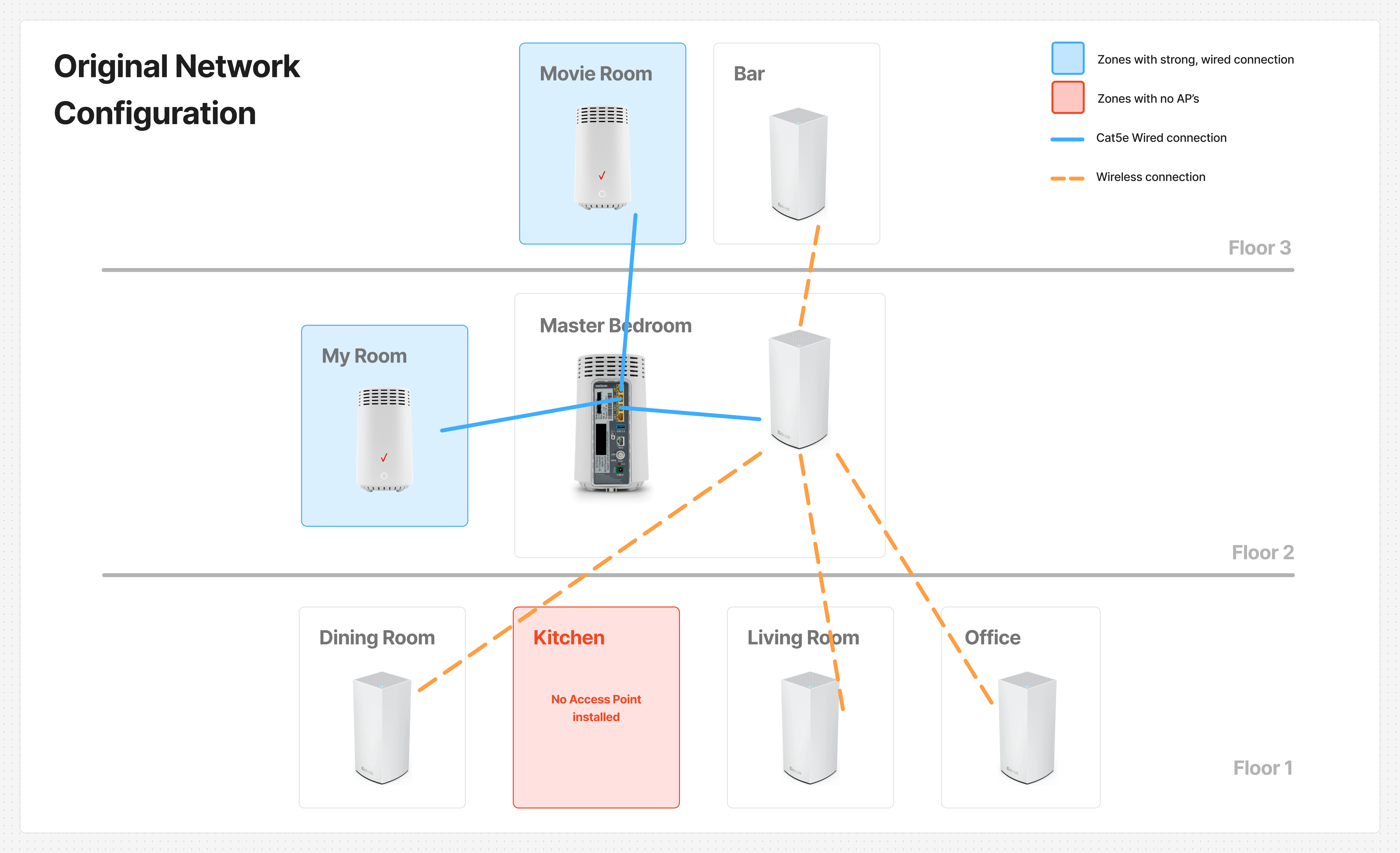
Floor 1
- Linksys AX3000 | Mesh Node (Dining Room)
- Linksys AX3000 | Mesh Node (Living Room)
- Linksys AX3000 | Mesh Node (Office)
Floor 2
- Verizon Fios G3100 | Router (Master Bedroom)
- Linksys AX3000 | Main Mesh Node
- Verizon Fios E3200 | Extender (My Room)
Floor 3
- Verizon Fios E3200 | Extender (Movie Room)
- Linksys AX3000 | Mesh Node (Bar)
The Problem
This configuration only gave us average download speeds of around 40–100 Mbps in important areas like the kitchen and office.
The first thing I noticed was that the Linksys mesh nodes were connecting to the network wirelessly instead of through Ethernet. Our house was built with steel beams rather than wood, which could have been weakening wireless signals and making it harder for them to travel throughout the house.
My goal was to connect the mesh nodes through Ethernet wherever possible instead of relying entirely on wireless connections.
My Approach
I wanted to make sure the Linksys mesh nodes had the strongest connections in the most internet-active areas of the house. I prioritized the office since my dad works from home, followed by the kitchen, which is always a busy spot.
Thankfully, our house already had Ethernet wall ports in almost every room. Looking back, I think a wired setup was the way to go all along, rather than relying on wireless signals to travel through steel.
The project was supposed to be pretty straightforward: move some mesh nodes around and connect them using Cat5e Ethernet cables. However, I discovered that the Ethernet ports in the office, kitchen, and living room weren't active.
Now I had to check the router to see which connections were active.
Our router was a Verizon Fios G3100, which has four LAN ports. Three of the four were already in use, so I traced the cables to figure out which rooms they connected to. As shown in the diagram above, they connected to my room, the movie room, and the main Linksys mesh node.
The main Linksys node was connected directly to the router, allowing it to communicate with the rest of the Linksys mesh network.
There were also several Cat5e Ethernet cables near the router that weren't plugged in. Among them were cables labeled "Kitchen" and "Office."
With one LAN port still available, I plugged the "Office" cable into the router and connected my laptop to the Ethernet port in that room. It worked! My laptop was finally getting a wired connection.
For some reason, the network technicians who had worked on our house in the past hadn't activated the kitchen or office ports. With all four LAN ports on the router now in use, I realized I'd need an extra port to activate the kitchen connection as well.
I ended up buying an 8-Port NETGEAR Gigabit Ethernet Unmanaged Network Switch.
Here's what the network looked like after I installed the switch:
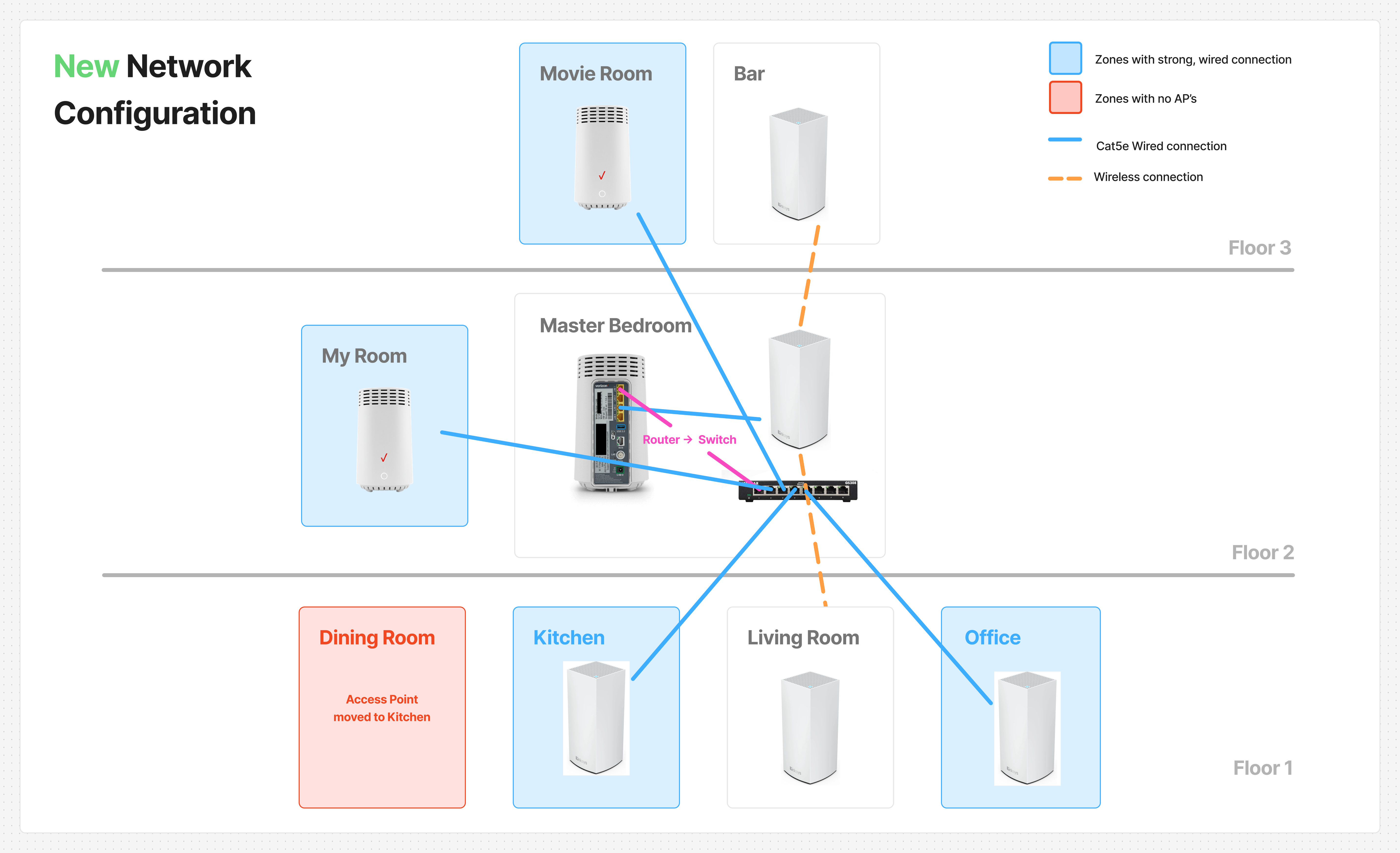
With the switch installed, I was able to connect the kitchen and office mesh nodes to the network through wired Ethernet. This gave us much more reliable connectivity in two of the most important areas of the house.
Unfortunately, there were still a bunch of unlabeled cables near the main router that didn't have RJ-45 connectors attached. I suspect the living room's Ethernet cable is among them, but I haven't been able to confirm that. The bar also didn't have an Ethernet port, so that Linksys mesh node had to remain on a wireless connection.
Results
| Room | Download Speed (Before) | Download Speed (After) |
|---|---|---|
| Office | ~60 Mbps | ~625 Mbps |
| Kitchen | ~40 Mbps | ~650 Mbps |
Speed tests conducted using Speedtest.net.
Takeaways
Mapping out your network is a great way to figure out how to get the best speeds in the areas that matter most. An Ethernet switch is also useful when you need extra ports without replacing your existing router.
Most importantly, if you have the opportunity to use a wired connection, definitely take it. In my case, switching to wired Ethernet made a huge difference in download speeds and gave us much more reliable connectivity in two of the most important rooms in the house.
What's Next?
I'd like to revisit the living room's Ethernet connection in a potential Part 2. There are several unlabeled cables near the router, and I suspect one of them leads to the living room. To figure out which cable is the right one, I'd use a tone generator and probe to trace it back to the router area.
Once I've identified the cable, I'd need to attach RJ-45 connectors to its ends so it can be plugged into the network switch and used for a wired connection.
That would let me see whether I can bring the living room's mesh node onto a wired connection as well ✓